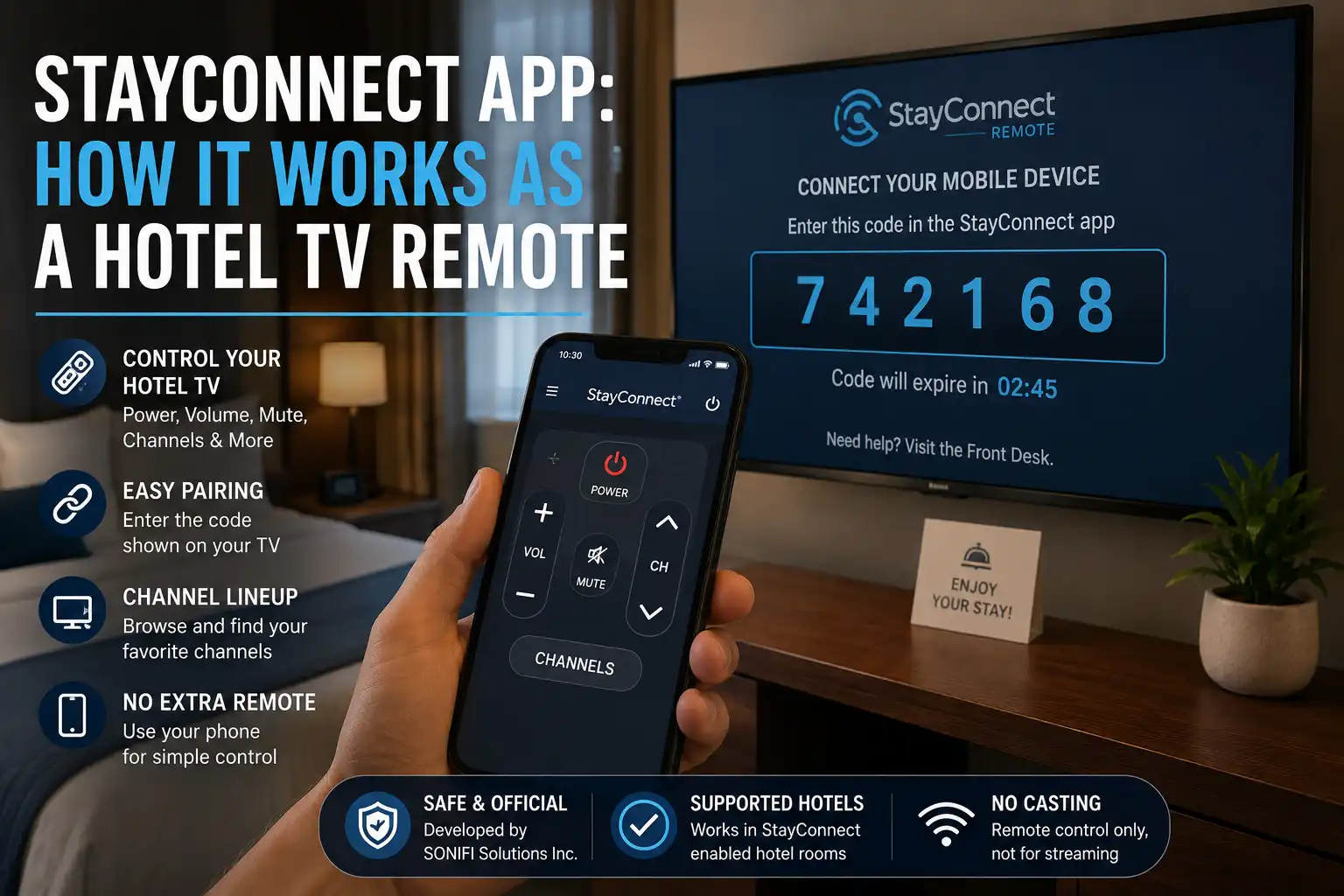
Hotel room TVs often feel confusing when the remote is missing, slow, or full of buttons you never use. frustration is exactly why the stayconnect app exists for travelers who want simple TV control inside hotels. It turns a supported hotel television into a phone-controlled system using a quick pairing code shown on the screen. Instead of guessing channels or pressing broken buttons users can manage volume power mute and channel lists directly from their device. This makes hotel stays more comfortable especially for business trips family vacations or late-night viewing in unfamiliar rooms. Unlike streaming apps stayconnect app does not cast content but focuses only on reliable remote control features for hotel systems. When used correctly it removes the need for physical remotes and gives guests a smoother modern in-room entertainment experience.
Quick Answer
The stayconnect app is a hotel TV remote app that lets guests control a supported hotel room TV from their phone. Its official app name is stayconnect® remote, and it is developed by SONIFI Solutions Inc. You use it by entering the pairing code shown on the hotel TV’s interactive menu.
It is important to understand what it is not. The StayConnect remote is not a streaming app, not a universal TV remote, and not a Chromecast replacement. It does not send Netflix, YouTube, Disney+, or other phone content to the TV. For casting, SONIFI has a separate hotel streaming product called STAYCAST.
StayConnect is useful when your room TV supports SONIFI’s system, the TV menu shows a code, and you want basic controls like power, volume, mute, channel changing, and a channel lineup from your phone.
What the StayConnect App Actually Does
The StayConnect app turns your Android phone or iPhone into a remote control for a supported hotel room TV. It works through a pairing code, not through a normal living-room TV setup.
That means the app is built for hotel systems. When the hotel TV has the correct SONIFI setup, the screen can show a code inside the interactive menu. You enter that stayconnect pairing code into the app, and your phone becomes a simple stayconnect TV remote.
Once paired, the app can usually help you turn the TV on or off, change volume, mute audio, switch channels, and browse the available channel lineup. That makes it useful when the physical remote is missing, dirty, slow, out of batteries, or across the room.
The stayconnect app hotel experience is very specific. It is not trying to replace every TV remote in your home. It is made for supported hotel rooms, mainly across North America, where SONIFI’s guest entertainment system is installed.
Where StayConnect Works in Hotels
StayConnect works only in hotels that support the SONIFI StayConnect system. The strongest sign is simple: your hotel TV shows a pairing code in its interactive menu.
If you open the TV menu and do not see any StayConnect option, pairing instructions, or mobile remote code, the app may not work in that room. This can happen even if another hotel in the same brand family supports it. Hotel TV systems are often managed property by property, not just brand by brand.
You may see StayConnect in many hotels across the United States and Canada because the app is designed for supported properties across North America. Still, you should not assume it will work in every room. Older hotel TVs, different entertainment vendors, disabled interactive menus, or network issues can stop the app from pairing.
A good rule is this: if the room TV does not show a code, the stayconnect remote has nothing to connect to.
How to Connect StayConnect to a Hotel TV
Follow these steps when you are inside a supported hotel room.
- Turn on the hotel TV with the physical remote or the TV power button.
- Open the TV’s main menu or interactive menu.
- Look for a mobile remote option, StayConnect option, or pairing instructions.
- Find the pairing code shown on the TV screen.
- Open the stayconnect app on your Android phone or iPhone.
- Enter the code exactly as shown on the TV.
- Wait for the app to confirm the connection.
- Test basic controls such as volume, mute, or channel change.
If the code expires or the app does not connect, return to the TV menu and generate or view the code again. Some hotel systems refresh pairing codes for safety or session control.
For best results, keep the TV on the pairing screen until your phone connects. Also make sure you downloaded the official stayconnect® remote app from Google Play or the Apple App Store, not a copied APK from a random download site.
What You Can Control After Pairing
After pairing, the StayConnect remote focuses on core TV controls. It is not packed with entertainment features because its job is narrow.
The main controls usually include:
- TV power on and off
- Volume up and down
- Mute
- Channel changing
- Channel lineup browsing
The channel lineup is one of the more practical parts of the app. Instead of pressing channel up and down without knowing what is available, you can view the hotel’s channel list from your phone. This is useful in hotels where channel numbers differ from what you use at home.
For a business traveler, the app can be helpful when working from bed or a desk. For families, it can help when the remote is missing under blankets or being used by someone else. For tourists, it makes late-night TV control easier without learning every button on the hotel remote.
What StayConnect Does Not Do
This is where many users get confused. The StayConnect app does not cast your phone screen to the hotel TV. It does not stream Netflix from your phone. It does not open your personal streaming apps by itself. It does not work like Chromecast, AirPlay, Roku, Fire TV, or a smart TV casting button.
The app also does not usually control every TV setting. Do not expect full input switching, HDMI control, picture settings, app store access, or smart TV account management. Some hotel TVs lock those functions because the property controls the entertainment system.
So, if you searched for a phone remote for hotel TV, StayConnect may be useful. If you searched for a way to cast Netflix to a hotel TV, you need a different solution. In SONIFI-supported hotels, that separate solution may be STAYCAST, not StayConnect.
StayConnect App for Android and iPhone
The stayconnect app download is available for both major mobile platforms.
For Android, search Google Play for stayconnect® remote by SONIFI Solutions Inc. This is the safer route for a stayconnect app Android download because Google Play shows the developer name, app details, and data safety information.
For iPhone, search the Apple App Store for stayconnect® remote by SONIFI Solutions, Inc. This is the correct route for a stayconnect app iPhone download.
Avoid third-party APK websites unless you fully understand the risk. A copied APK may be outdated, modified, or bundled with unwanted behavior. Hotel guests should be extra careful because travel already involves public Wi-Fi, shared TVs, and unfamiliar networks.
StayConnect vs STAYCAST
StayConnect and STAYCAST are often mixed up because both are connected to SONIFI and hotel room entertainment. They are not the same product.
| Feature | StayConnect Remote | STAYCAST |
| Main purpose | Controls hotel TV like a remote | Casts or streams personal app content |
| Main user action | Enter TV pairing code into remote app | Pair device for casting in supported rooms |
| Used for Netflix casting | No | Yes, when the hotel supports it |
| Replaces hotel remote | Partly | No |
| Controls channels and volume | Yes | Not its main job |
| Product type | Hotel room TV remote app | Hospitality casting/streaming solution |
The easiest way to understand stayconnect vs STAYCAST is this: StayConnect controls the TV. STAYCAST sends content to the TV.
If your hotel room has only StayConnect, you can use your phone as a remote. If the hotel also supports STAYCAST, you may be able to cast supported streaming apps from your phone to the room TV without entering your personal login details directly on the shared TV.
Common StayConnect Problems and Fixes
StayConnect pairing code not showing
If the stayconnect pairing code does not appear, first make sure you are inside the TV’s interactive menu, not just watching a normal channel. Use the hotel remote to open the main menu and look for mobile remote, StayConnect, or pairing instructions.
If nothing appears, the room may not support the app. You can also ask the front desk whether the property uses SONIFI StayConnect in guest rooms.
StayConnect app not working
If the stayconnect app not working issue appears after download, check whether you are in a supported hotel room. The app needs the hotel TV system to provide a code. Without that code, the app cannot act as a remote.
You should also update the app, restart your phone, close and reopen the app, and try pairing again from the TV menu.
StayConnect remote not connecting
When the stayconnect remote not connecting problem happens, check the code first. Enter it again carefully and watch for expired codes. If the TV menu can refresh the code, use the latest one.
Also try turning the TV off and on with the physical remote, then reopen the interactive menu. If the room’s TV system is offline, only hotel staff or SONIFI support can fix it from the property side.
Channel list missing
If the channel list does not load, the remote may still control basic functions while the lineup data is unavailable. Close the app and reconnect. If the issue remains, the hotel’s channel data may not be available for that room or system.
Remote controls not responding
If buttons appear in the app but the TV does not respond, check whether the app still shows as connected. Try a simple action like mute or volume down. If nothing works, disconnect and pair again.
If the physical remote also fails, the issue may be with the TV, set-top box, or hotel entertainment system. In that case, contact the front desk rather than reinstalling the app repeatedly.
Privacy and Safety Tips for Hotel Guests
Download StayConnect only from the official app stores. On Android, use Google Play. On iPhone, use the Apple App Store. Check the developer name before installing.
Be careful with APK sites. Even when an APK page looks clean, you may not know whether the file is current or unchanged. For a hotel remote app, the official store version is the safer choice.
Review app permissions before using it. A remote-control app should not need access to sensitive personal files. If your phone shows unusual permission requests, stop and verify the app source.
Do not enter streaming usernames or passwords into random hotel TV screens unless you trust the system and know how to sign out. If the hotel uses STAYCAST or another casting system, prefer options that avoid entering credentials directly on the shared TV.
Before checkout, disconnect your device from any hotel casting or TV system if the option appears. For basic StayConnect remote pairing, the session is tied to the room system, but it is still smart to close the app and avoid leaving personal accounts open on the TV.
When the App Is Useful
The stayconnect app is useful when you want quick control over a supported hotel TV without depending on the physical remote. It makes sense for travelers who mainly watch hotel channels, news, sports, weather, or local programming.
It can also help when the remote is not working well or when you prefer using your own phone for simple controls. The channel lineup can save time because hotel TV channels are often unfamiliar.
It is less useful if your main goal is streaming. For Netflix, Disney+, Hulu, YouTube, or screen casting, you need the hotel’s casting setup, built-in smart TV apps, your own travel streaming device, or a separate system such as STAYCAST if the hotel supports it.
Final Verdict
The StayConnect app does one narrow job: it turns your phone into a remote for supported hotel room TVs. That narrow job is also the reason many bad expectations happen. It is not a streaming platform. It is not a universal remote. It is not the same as STAYCAST.
Use the stayconnect app when your hotel TV shows a pairing code and you want to control power, volume, mute, channels, and the channel lineup from your phone. Do not download it expecting Netflix casting or full smart TV control.
For supported rooms, it can be a practical hotel room TV remote app. For unsupported rooms, it will not help much because the pairing code is the key.
FAQs
What is the StayConnect App?
The StayConnect App, officially called stayconnect® remote, is a hotel TV remote app by SONIFI Solutions Inc. It lets you pair your phone with a supported hotel room TV.
How do I connect StayConnect to a hotel TV?
Open the hotel TV’s interactive menu, find the StayConnect pairing code, open the app, and enter the code into your phone.
Does StayConnect work in every hotel?
No. It works only in supported hotel rooms where the TV system shows a StayConnect code or mobile remote pairing option.
Why is StayConnect not connecting?
The most common reasons are an unsupported TV system, an expired or incorrect pairing code, a hotel TV system issue, or an app version that needs updating.
Where do I find the StayConnect pairing code?
Look inside the hotel TV’s interactive menu. If the TV does not show a code, ask the front desk whether the room supports StayConnect.
Can StayConnect stream Netflix?
No. StayConnect is not made for Netflix streaming or casting. It works as a remote control. For casting, check whether the hotel supports STAYCAST or another casting system.
Is StayConnect the same as STAYCAST?
No. StayConnect is a remote-control app. STAYCAST is SONIFI’s separate hotel casting and streaming solution.
Is StayConnect available for Android?
Yes. The stayconnect app Android version is available on Google Play as stayconnect® remote by SONIFI Solutions Inc.
Is StayConnect available for iPhone?
Yes. The stayconnect app iPhone version is available on the Apple App Store as stayconnect® remote by SONIFI Solutions, Inc.
Is StayConnect safe to use?
It is safest when downloaded from Google Play or the Apple App Store. Avoid unofficial APKs, review permissions, and do not enter personal streaming passwords into unknown hotel TV screens.