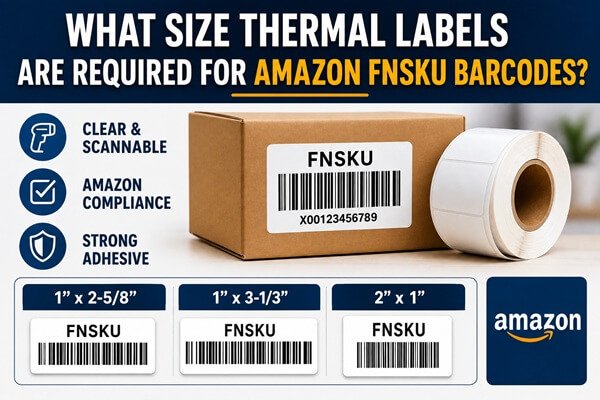
Amazon FNSKU labels must be large enough to preserve the barcode, required text, and clear space around the symbol, while still fitting the product or its packaging. Amazon’s commonly cited label range is between 1 × 2 inches and 2 × 3 inches, but the correct choice is the format currently offered for your workflow and the size that prints without scaling or clipping.
Do not choose a label only because it physically fits the item. Start with the barcode file generated in Seller Central, check the current paper and placement requirements, and select a supported size that leaves a readable symbol after printing. Small products may need an outer bag, carton, hang tag, or other approved packaging surface.
Is There One Standard FNSKU Label Size?
There is no single size that suits every product and printing method. A widely used sheet format is approximately 1 × 2 5/8 inches, while thermal users often work with other sizes within Amazon’s accepted range. What matters is that the complete generated content fits and remains scannable.
The choices visible in Seller Central can depend on the label workflow and region. Treat the current help page and download options in your account as the controlling reference. Do not crop a larger layout to force it onto an unsupported label, because that can remove text or required clear space.
What Must Fit on the Label?
The label normally includes the Amazon barcode and human-readable information generated with it. The barcode needs clear, unprinted space around it so a scanner can distinguish the start and end of the symbol. Text and graphics must not enter that quiet zone.
Print the entire file exactly as generated unless the current instructions specifically allow changes. Avoid adding a logo, border, SKU note, or promotional message near the barcode. Extra content reduces usable space and can introduce dark marks that interfere with scanning.
How Do Product Dimensions Affect the Choice?
Measure the flat, usable area rather than the total package width. Subtract seams, curves, caps, openings, legal text, and areas covered by shrink film folds. A label that fits across two panels is not truly compatible because bending can distort the barcode.
For a small bottle or tube, rotate the label so the barcode bars remain readable and place it on the least curved area. If the required label cannot lie flat, place the product in suitable outer packaging and label that surface. Never reduce the barcode until it merely looks convenient.
Should You Use 1 × 2, 2 × 1, or 2 × 3 Labels?
Orientation matters because printer drivers describe width and height differently. A nominal 2 × 1 label may be the same physical rectangle as 1 × 2, but the generated layout, feed direction, and printer definition must agree. Verify the preview and printed result rather than relying on the product name.
Larger labels provide more tolerance for text and quiet zones and are easier to apply on flat packages. Smaller labels save space but demand accurate printing, a clean printhead, and sufficient resolution. Choose the smallest size that passes repeatable scan tests without modifying the generated proportions.
Does Printer Resolution Change the Required Size?
Resolution does not replace Amazon’s dimensional rules, but it affects how cleanly a small barcode can be reproduced. A 203 dpi printer is often adequate for ordinary product labels when the barcode is sized correctly. A 300 dpi printer provides more dots for small text, narrow bars, and compact symbols.
Do not compensate for low resolution by applying excessive heat. High darkness can spread bars and close narrow spaces. Use a compatible label stock, moderate speed, and the lowest darkness that produces solid black bars with sharp edges.
How Do You Configure the Page Size?
Create a custom stock size in the printer driver that matches the measured label width and height. Select the same size in the application or PDF workflow. Set scaling to 100% or Actual Size and disable Fit to Page. Confirm that orientation does not rotate and shrink the content.
Calibrate the printer after loading a new size. Print one label, measure the margins, and ensure the barcode is centered within the usable area. If content is clipped, fix the driver and file format rather than reducing the page percentage until it appears to fit.
What Adhesive and Surface Are Appropriate?
Follow the current Amazon requirement for the product-label adhesive and choose a construction compatible with the package. The label must remain attached through preparation, transportation, receiving, storage, picking, and customer delivery, yet meet any removability requirement that applies to the program.
Test the adhesive on the actual carton, glass, plastic, metal, or poly bag. Recycled board, powder-coated containers, flexible films, cold surfaces, and textured packages behave differently. Apply samples at the real temperature and inspect them after at least 24 hours.
How Should Existing Barcodes Be Handled?
When the FBA workflow requires an Amazon barcode, other scannable product identifiers should be fully covered. Select a label large and opaque enough to block the old barcode. A translucent label or a narrow label that leaves part of the original symbol visible can cause the wrong code to be scanned.
Do not place the FNSKU directly over a raised, embossed, or damaged barcode area if that creates an uneven surface. Use an adjacent flat area and an approved opaque cover label where necessary. Confirm that no barcode is visible through transparent packaging from another side.
How Do You Approve a Label Size Before Ordering?
- Download a real FNSKU file for a representative SKU.
- Print at 100% on the proposed size and printer resolution.
- Measure the label and inspect every edge of the barcode and text.
- Apply it to the smallest and most difficult package in the range.
- Scan it from normal working distances and after handling.
Repeat the test with labels near the roll core and after the printer has warmed up. Approve the construction, not only the dimensions. The label maker should receive the printer model, sensing method, roll direction, core, outside diameter, adhesive, opacity, and packaging samples.
What Is the Safest Purchasing Rule?
Buy the label size that matches a current supported output, preserves every required element at 100% scale, fits a flat package area, and passes scanning after application. Keep separate specifications for product labels and carton shipping labels; they solve different identification tasks.
Before a large order, request production samples and run them through the complete packing process. Recheck Amazon’s current instructions whenever packaging, marketplace, fulfillment program, printer, software, or SKU setup changes. A few minutes of size verification prevents thousands of unusable labels and relabeling work.